
tidy-4
A personal assistant that can learn to use any app you use
Tidy Wants to Be the Agent That Learns Your Whole Digital Life. That's Either Brilliant or a Lot to Promise.
The Macro: The Agent Race Has a Trust Problem
Everyone making AI productivity tools right now is selling the same fantasy: one assistant to rule everything, no friction, just results. The pitch sounds great until you realize most of these tools are either locked to specific apps, require you to be a developer to customize anything meaningful, or hand over your credentials to a black box and ask you to just trust them.
Productivity apps generated over $30 billion in revenue in 2024, according to Business of Apps, up more than 17% on the prior year. The AI slice of that is growing faster. Grand View Research puts the AI productivity tools market at roughly $8.8 billion in 2024 and projects it hitting $36 billion by 2033. So yes, there is money here. A lot of it.
Here’s the thing, though. Growth numbers don’t tell you whether anyone’s actually built a tool that fits how people work. The market keeps expanding because everyone’s still looking for something that actually works.
Computer-use agents are the current frontier. You’ve got players like OpenAI with Operator, Anthropic pushing Claude’s computer-use capabilities, and a growing wave of smaller tools trying to carve out niches. Most of them are either too technical, too expensive, or too enterprise-focused to be useful to a person who just wants their browser to stop being a full-time job. I’ve written before about how the agency tab graveyard is a real phenomenon, and it’s only getting more crowded.
Which, look. The question isn’t whether AI agents are interesting. They obviously are. The question is whether any of them can actually stick with a regular person’s actual workflow without demanding a computer science degree as the entry fee.
Tidy is placing a bet that the answer is: teach it yourself, no code required.
The Micro: iMessage as a Control Panel Is a Weird Flex That Might Actually Work
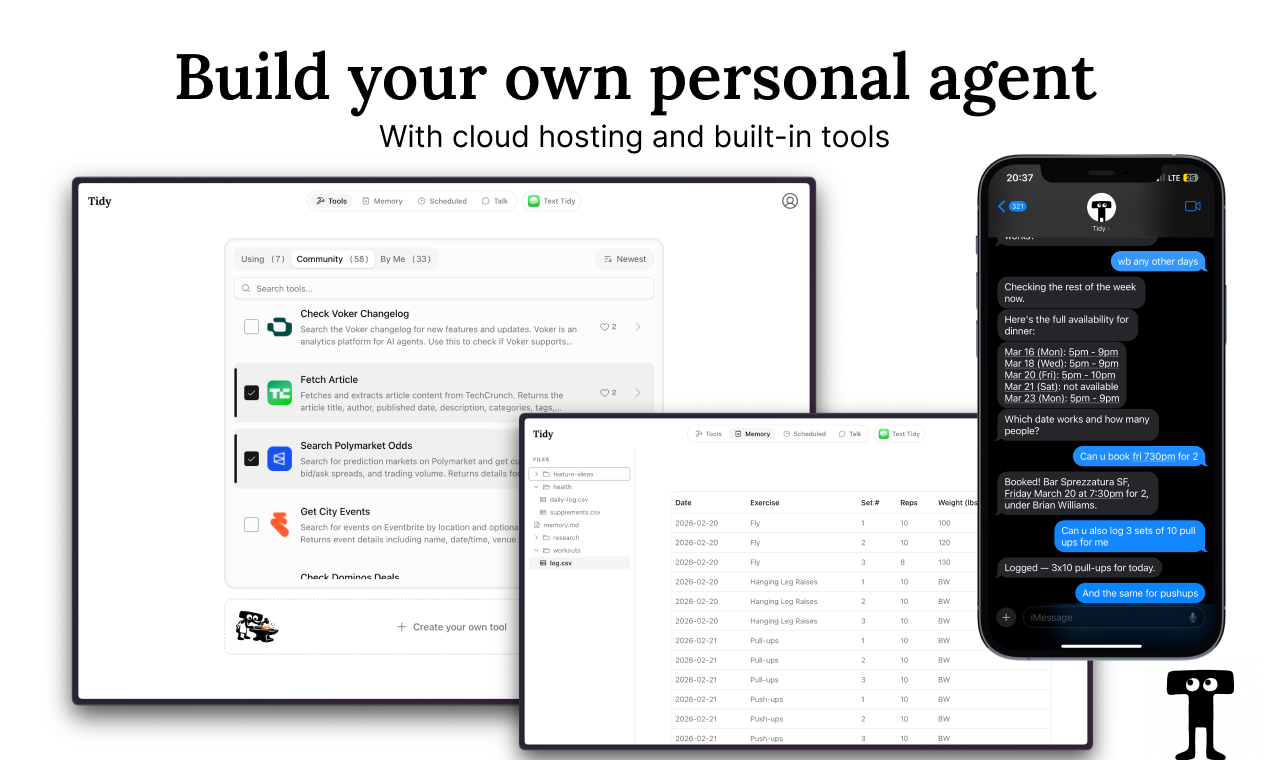
Tidy describes itself as a personal agent that can use any app you use, because you teach it to. The pitch is simple. Show it how to navigate a website, and it remembers. No code, no API keys, no developer setup. It runs fully in the cloud, which means it’s not dependent on your laptop being open or your browser being active.
The interface choice is genuinely surprising. Tidy talks to you through iMessage and Slack. That’s it. There’s no new app to download and forget about in a week. You’re just texting your agent like you’d text a person, and it handles tasks in the background. For a certain type of person, especially anyone who has watched screen recording-based onboarding tools try to reinvent digital workflows, this frictionless entry point is going to land.
The community tools section on the site gives you a sense of the range. You can pull Y Combinator company data filtered by batch or hiring status. You can search StreetEasy apartment listings by price, neighborhood, and move-in date. You can monitor Costco product pages. You can get Bloomberg crypto article summaries with automatic stablecoin flagging. These aren’t toy demos. They’re specific, opinionated tools someone built for a real use case.
The comparison to OpenClaw is mentioned directly on the site. Tidy is positioning itself as the no-code, cloud-hosted version of that approach.
The persistent filesystem is an underrated detail. Memory across sessions, notes that stick, a record of what the agent has done. That’s not a given in this category.
It got solid traction when it launched, which tracks. The idea is easy to explain and the use cases feel genuinely useful rather than contrived.
My one observation: the teaching mechanism is the whole product. If showing Tidy how to use a site is clunky or brittle, nothing else matters. The site doesn’t go deep on how that actually works, and I’d want to know before I handed it my workflows.
The Verdict
Tidy is doing something I actually find interesting, which is treating the teaching step as a feature instead of a bug. Most agents pretend the setup doesn’t exist. Tidy leans into it. That honesty is refreshing, and the iMessage interface is a smart bet on meeting people where they already are rather than building yet another dashboard they’ll ignore.
The risk is obvious. An agent that requires teaching is only as good as the patience of the person doing the teaching. If the workflow for showing Tidy a new site is more than three or four steps, adoption will stall. People will use the pre-built community tools and never go deeper. That’s fine at first, but it caps the ceiling pretty quickly.
Thirty days from now I’d want to know how many users have created a custom tool versus only using community ones. Sixty days, whether those custom tools keep running reliably or degrade as websites update their layouts. Ninety days, whether the iMessage interface is enough surface area or whether people start asking for something more visual.
For anyone already deep in building their own productivity stack from browser extensions and saved tabs, Tidy feels like a natural next step. For everyone else, the pitch is clear enough that it’s worth five minutes to find out.
I’d just want to see the teaching flow before I committed to anything.
Also featured on HUGE: TamLabs Thinks AI Can Redesign Knowledge Work and They’re Starting with Professional Services · Dex Wants to Be the AI Coworker That Actually Lives Where You Work · Stamp Thinks Your Email Client Should Think For You