subscription-day-for-ios
Track paid subscriptions w/ analytics from multiple sources
Your Subscriptions Are Bleeding You Out. This Calendar App Wants to Staunch the Wound.
The Macro: You Are Paying for Things You Forgot Exist
Subscription fatigue is the wrong diagnosis. The actual problem is amnesia.
The average person is subscribed to more streaming services, SaaS tools, and wellness apps than they can list from memory, and billing cycles are deliberately staggered so the full damage never lands at once. Personal finance apps have known this for years. The response has been a lot of apps.
The subscription tracker space is genuinely crowded. Rocket Money (formerly Truebill) is probably the most recognized name at the consumer end. It hooks into bank accounts, surfaces recurring charges automatically, and will negotiate cancellations on your behalf. Then there’s the App Store’s native subscription management, which is technically functional if you only care about Apple billing and have no interest in your Notion plan or the obscure SaaS tool your freelance brain decided was essential in 2022. CNBC’s subscription tracker roundup and Rob Berger’s list both surface solid alternatives across this category.
What’s shifted recently isn’t awareness. People already know they’re overspending on subscriptions. The gap is visibility. Specifically, the kind of at-a-glance visibility that makes a cost feel real instead of abstract. A dashboard full of numbers is easy to ignore. A calendar showing you Thursday is going to cost $47.99 is harder to scroll past.
That’s the design bet behind the subscription-calendar hybrid approach. It’s not a new idea, but it’s different enough from the bank-linking aggregator model that it’s carved out a real user segment. People who want manual control, don’t want to hand over banking credentials, and are willing to do a little data entry in exchange for something that actually feels usable.
The Micro: A Calendar App That Knows What “Renews Monthly” Actually Means
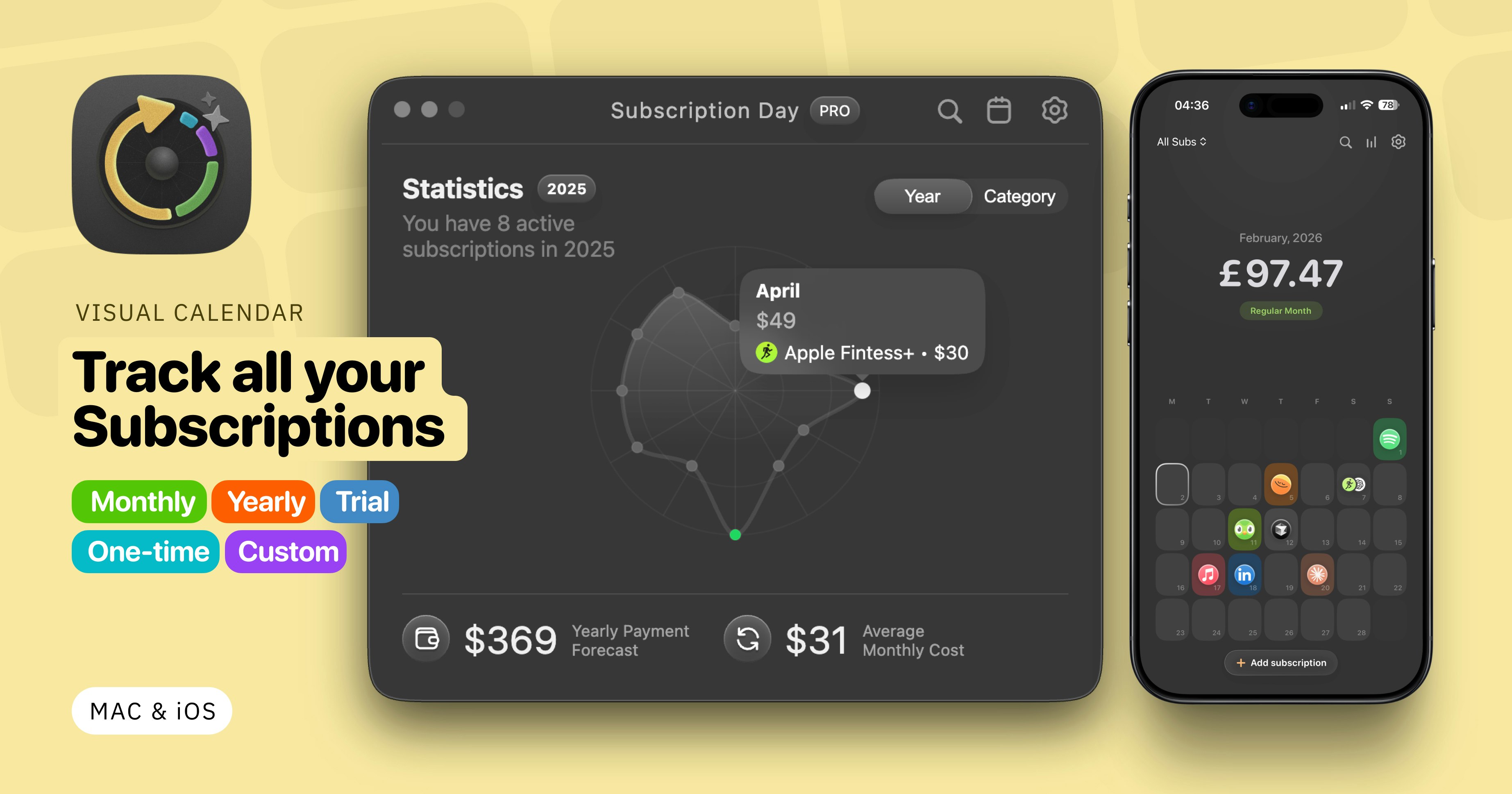
Subscription Day² is a calendar-first subscription tracker for macOS and iOS. Instead of staring at a running total or a sortable list, you see upcoming charges laid out on a mini calendar interface. The temporal relationship between charges is the primary UI, not an afterthought.
The feature set is more considered than that description suggests.
Multi-currency support covers 168 currencies with live exchange rate conversion. That matters more than it sounds if you’re paying for international SaaS tools or managing subscriptions across regions. iCloud sync handles cross-device continuity, which is table stakes for anything touching Apple’s platforms but worth mentioning since some competitors handle it poorly. The import manager pulls subscriptions from the App Store, Notion, or Google Sheets, and that’s actually the most interesting technical decision here. You’re not connecting a bank account. You’re importing a list. That’s a privacy-forward tradeoff some users will actively prefer.
Fast-adding is also a real UX consideration. Type a service name and the app reportedly auto-fills the logo, color, and category. That’s the kind of small friction reduction that determines whether someone maintains a tracker for six months or abandons it after two weeks.
It got solid traction on Product Hunt at launch, which tracks for a v2 plus new platform release rather than a debut. The iOS expansion is the actual news. The Mac version existed before this. The question worth asking is whether the iOS launch meaningfully expands the user base or mostly just serves existing Mac users who wanted mobile access.
Requires iOS 17.0+, which cuts out older devices. That signals the team isn’t interested in supporting legacy edge cases, which is a reasonable call.
The Verdict
Subscription Day² is solving a real problem with a coherent design philosophy. Manual entry, calendar visualization, no bank credentials required. For a specific type of person, privacy-conscious, Apple-native, mildly obsessive about where their money goes, this is probably the right tool.
The concerns are predictable but not trivial. Manual entry is a feature until life gets busy, the tracker falls behind, and an inaccurate subscription tracker is almost worse than none at all. Apps that have stuck in this space either automate the data layer or build enough habit-forming UX that users stay engaged regardless. It’s not obvious yet which side of that line Subscription Day² lands on.
At 30 days, the signal is retention. Specifically whether the iOS launch brought in net-new users or just migrated existing ones. At 60 days, it’s whether the import flows from Notion and Google Sheets are actually reducing setup friction enough to change behavior. At 90 days, the question is whether anything makes this sticky beyond individual utility.
What I’d want to know before fully endorsing it: how does the calendar UI hold up when someone has 20+ subscriptions? Does it get cluttered, or does the design scale? That’s the stress test that separates a polished demo from something people actually live in.
Also featured on HUGE: Trata Thinks AI Can Write Better Investment Research Than Your Analyst · Finbar Is Already Inside the Hedge Funds You’ve Heard Of · Mesh Wants to Kill Your Accrual Spreadsheets Before Month-End Kills You