textab
Turn any AI task into a Keyboard Shortcut
Your AI Keeps Living in a Tab. TexTab Wants to Put It in Your Fingers.
The Macro: Everyone’s Building AI, Nobody Fixed the Interface
The AI productivity tools market sat at roughly $8.8 billion in 2024 and is projected to hit somewhere north of $36 billion by 2033, according to Grand View Research. A CAGR of around 16% that has every product manager in the Valley appending “AI-powered” to their Jira tickets. The broader productivity software market is doing its own parallel thing: one report pegs it growing from $62.5 billion to $142.9 billion by end of decade. The numbers are, in a word, embarrassingly large.
Most of that investment has gone into the AI layer. Not the interaction layer.
ChatGPT, Claude, Gemini, they all live in a browser tab, or at best a dedicated desktop app you have to manually switch to. The workflow is: write something, alt-tab, paste, prompt, copy, alt-tab back, paste again. Not painful enough to make people quit. Annoying enough that people have started asking if there’s a better way.
A few players are attacking this from different angles. Witsy does AI-via-shortcut on desktop. RewriteBar targets the writing-assist slice specifically. TeamSmart AI went after the Chrome extension angle. The pattern is real. Power users want AI closer to their cursor, not one browser tab further away. What nobody has fully nailed is a setup that’s genuinely flexible, multiple providers, bring-your-own-key, works across every app, rather than one that just wraps a single model in a shinier box. That gap is exactly where TexTab is trying to park itself.
The timing makes sense. As API costs fall and models get fast enough that latency isn’t a conversation-killer anymore, the case for lightweight local orchestration tools gets stronger. Things that sit between you and the model without adding much overhead. That category is real now in a way it wasn’t two years ago.
The Micro: A Hotkey Layer for the AI Stack You Already Have
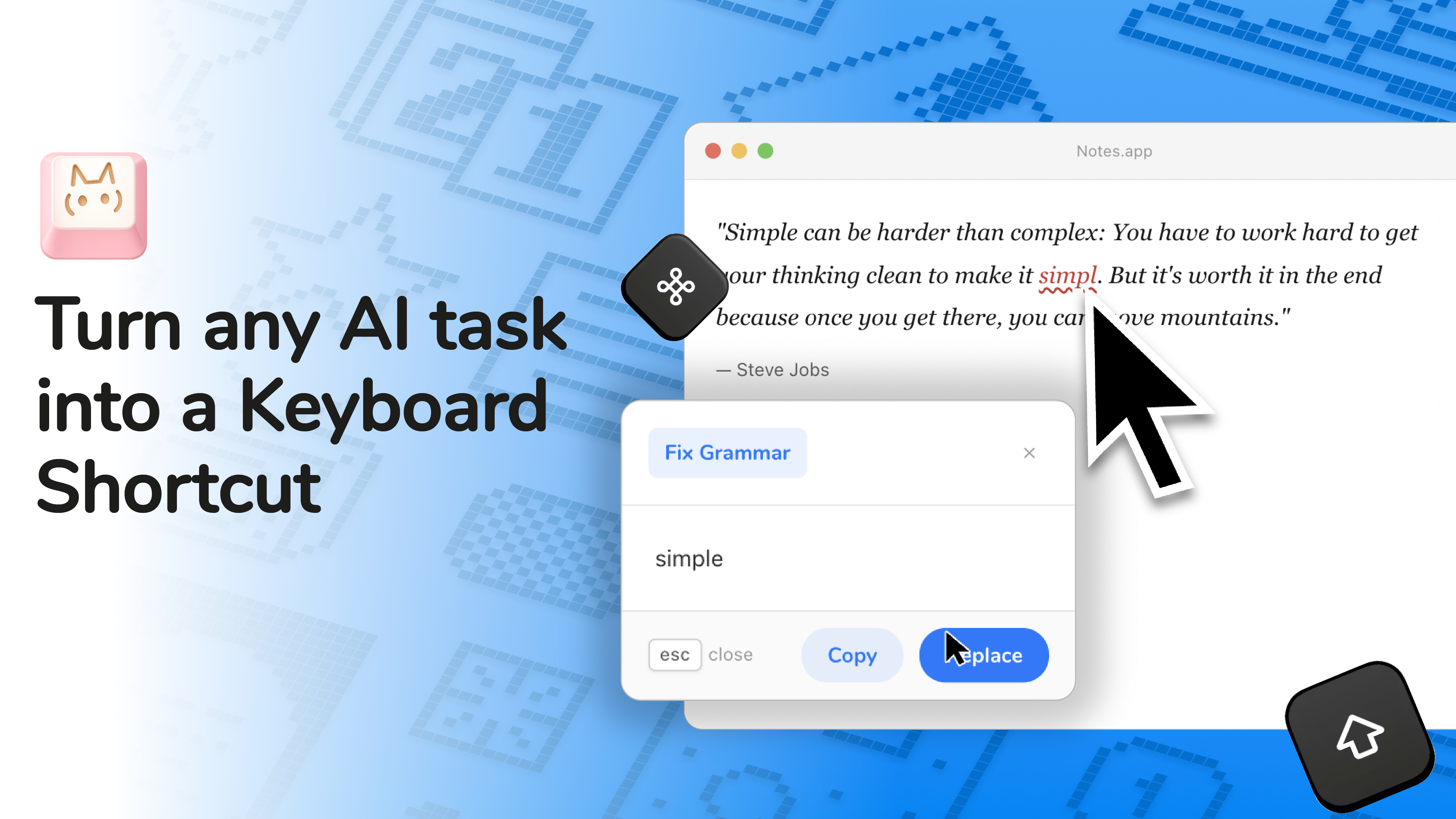
TexTab is a macOS menu bar app, currently in beta and open source on GitHub under the handle ELPROFUG0. It lets you define arbitrary AI actions, translate this, rewrite this more bluntly, summarize this into three bullets, whatever you want, and bind each one to a keyboard shortcut. Select text in any app, hit your shortcut, get a result in a popup. That’s the core loop.
The technical decisions are worth spelling out because they are the value proposition.
First: bring-your-own-API-key. You connect directly to OpenAI, Anthropic, Groq, Perplexity, or OpenRouter. No TexTab subscription, no middleman margin, no data routing through a proxy you don’t control. The right call for anyone already paying for API access who doesn’t want to pay again for the wrapper. Second: it works in any macOS app. Browsers, email clients, IDEs, terminal. The selection-to-shortcut flow doesn’t care where you are. Third: prompt enhancement, a built-in one-click improver that tries to structure your rough instructions into something the model handles better. Useful if you’re not the type to obsess over prompt engineering, which is most people.
There are native plugins in beta. A chat popup, QR code generator, image converter, color picker. The chat popup is the one that actually competes with Raycast AI and similar launchers, multi-turn with streaming responses. The other plugins feel like feature list padding, but they’re not in the way, so I’m not going to hold it against them.
It got solid traction on launch day on Product Hunt. The comment count was low relative to votes, which could mean people upvoted and moved on without strong opinions, or that the product is simple enough there isn’t much to ask about. Probably both.
According to the product site, the founder is Rafal Urbanski, listed on LinkedIn as a Principal Technical Architect at Salesforce with an AI and automation focus. Which at least explains why the technical architecture is as coherent as it is.
The Verdict
TexTab is solving a real problem with a sensible approach. The open-source angle plus bring-your-own-key model puts it on the right side of the user-trust question that’s quietly killing a lot of AI wrapper apps right now.
For a specific type of user, technically comfortable, already API-subscribed, lives in a Mac workflow, this is the kind of tool that becomes invisible in the best possible way. You just stop thinking about the context-switching. It handles that part.
The failure modes are predictable. Setup friction is real. You need API keys, you need to think about which models you want, you need to author your own shortcuts. Fine for the people who showed up on launch day, genuinely a wall for anyone without the patience to configure things before they see value. If TexTab wants to grow past that initial cohort, a curated library of starter actions, shareable, downloadable, community-built, would do more than any new feature currently on the roadmap. That’s my actual suggestion, not a hedge.
At 30 days, I’d want to see retention data from the beta. At 60, whether they ship the iPhone app listed as coming soon on the site. At 90, whether anyone outside the power-user bracket has figured out how to use it without a tutorial.
None of that is disqualifying yet. Right now it’s a promising, honest utility. And honestly, that’s rarer than it sounds.
Also featured on HUGE: Sway Thinks You Talk Too Much, In the Best Possible Way · Voicr Wants to Be the Translator Between Your Brain and Your Keyboard · TamLabs Thinks AI Can Redesign Knowledge Work and They’re Starting with Professional Services