claude-in-powerpoint
Use Claude to build, edit & refine PowerPoint presentations.
Anthropic Just Put a Slide Jockey Inside PowerPoint. That's Actually the Interesting Part.
The Macro: The Deck Is Not the Problem, the Workflow Is
There are roughly a thousand ways to make a slide deck in 2025. You can use Canva, Pitch, Beautiful.ai, Gamma, Google Slides, or the same version of PowerPoint your company has been licensing since 2014. The proliferation of AI-native presentation tools has been real and fast, but most of them share the same fatal assumption: that you’re willing to start somewhere new.
Most people aren’t.
PowerPoint has north of 1 billion users. That’s not a number I’m citing to be dramatic. It’s the structural fact that explains why every enterprise software integration story eventually runs through Microsoft Office. It’s why AI coding tools compete on IDE integration, not standalone apps. The platform with the installed base wins the distribution war without trying.
What’s happened in the presentation category over the last two years is interesting to watch. Gamma built a genuinely fresh take on decks and got real traction. Tools like Tome tried to reimagine the format altogether. But both approaches require you to leave PowerPoint, which means leaving your company’s approved templates, your existing client decks, your slide libraries, and your colleague who will absolutely send you a .pptx file regardless of what you prefer. The friction of migration is underestimated constantly in this category.
Meanwhile, Microsoft has been slowly threading Copilot into Office, with mixed results. The reviews have been lukewarm. There’s a real opening for a focused, capable alternative sitting inside the same window. According to Deloitte, AI integration into enterprise software is expected to generate around $10 billion in revenue uplift for that sector. Anthropic, with Claude in PowerPoint, is clearly making a calculated bet on capturing some of that from inside the tool rather than adjacent to it. That bet is worth taking seriously.
The Micro: What Claude Actually Does When You Select a Slide
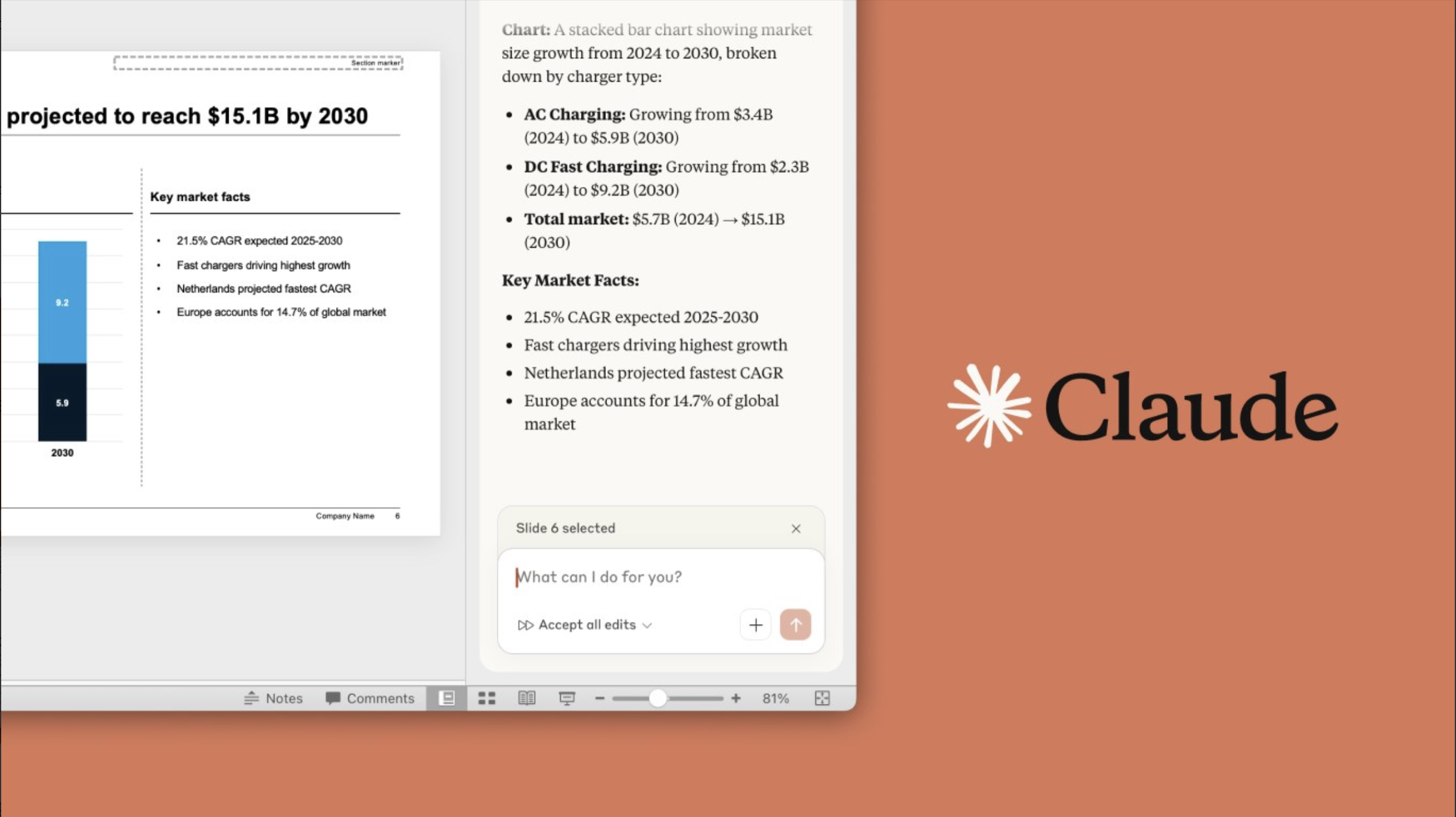
Claude in PowerPoint is an add-in you install through the Microsoft marketplace. It works inside PowerPoint alongside your existing deck, not as a replacement for it. That’s the whole product philosophy in one sentence.
The core mechanic is contextual awareness. Claude reads your active slide master, your layouts, your fonts, your color palette. When you ask it to build a market sizing section with TAM, SAM, SOM slides, it generates those slides using your brand’s actual formatting, not generic defaults. This is the part that separates it from pasting ChatGPT output into a text box and hoping for the best. Several LinkedIn users who tested early versions noted the template fidelity specifically, and one user reported feeding it an existing offering memorandum template with positive results.
You can also ask Claude to edit a specific selected object on a slide. It knows what you have selected, which means edits are precise rather than sweeping. You can tell it to simplify the text on slide 4, combine slides 5 and 6, or convert a bullet list into a process flow diagram. Those diagrams come out as native PowerPoint objects, fully editable, not locked images.
The live data connectors are the newer addition and, to me, the more interesting one. According to the product page, Claude now connects to external tools to pull context directly into slides. The practical version of that: pulling in CRM data, live metrics, or content from other daily tools without manually copying anything. It’s currently available on Pro, Max, Team, and Enterprise plans. It got solid traction when it launched.
One real limitation noted by at least one reviewer: image generation isn’t a strength. For presentations that rely heavily on visuals, they pointed toward other tools. That’s a real gap if your deck is more visual than text.
The AI-in-documents space is crowded with tools that want to automate the whole thing. What I find more honest about this product is that it’s built around the assumption that AI should edit, not replace your workflow, which is increasingly where the useful tools land.
The Verdict
I think this is a genuinely good product decision, maybe more interesting for the strategic positioning than the feature set alone.
Living inside PowerPoint is not a compromise. It’s the actual insight. The users who need this most are the consultants, the marketers, the analysts who live in .pptx files and don’t have the leverage to move their whole team to a new platform. Meeting them where they are is smart product thinking, not laziness.
The template fidelity claim is the one I’d want to stress-test at 30 days. Does it hold up across complex slide masters with lots of custom layout variations? That’s where most AI tools start making embarrassing choices. The live connectors need the same scrutiny. Integration promises are easy to make and hard to make reliable.
At 90 days, the question is retention. Does it actually save enough time that Pro plan users feel the subscription is justified by this feature specifically? Or does it become a novelty after the first few decks?
What I’d want to know: how it handles the inevitable edge case where the slide master is a mess, which is most corporate templates. That’s the real test.
If it passes that test consistently, this is the AI presentation tool that actually ships to the people who make the most slides.
Also featured on HUGE: One Guy, One Prompt, and a $50K ARR Argument Against the Entire Stock Footage Industry · Nobody Likes Filling Out Forms. This Open-Source Project Wants You to Talk Instead. · The SEO Spider That Lives on Your Machine, Not Someone Else’s Server