


























hearica
Turn all computer audio into captions for the deaf
Hearica Is Building Captions for Your Whole Computer. That Sounds Obvious. It Wasn't.
The Macro: The Captioning Gap Nobody Fixed
There’s a quiet assumption baked into most accessibility software: that life happens in one app at a time. Zoom has captions. YouTube has captions. Google Meet has captions. Each platform built its own solution, inside its own walls, for its own context. The result is a patchwork that falls apart the moment someone hops between a podcast, a video call, and a voice memo in the same afternoon.
For deaf and hard-of-hearing users, that’s not an edge case. That’s Tuesday.
The productivity software market is enormous and growing fast. Multiple research firms peg the broader category well into the tens of billions, with AI-powered productivity tools specifically projected to grow from around $8.8 billion in 2024 to over $36 billion by 2033, according to Grand View Research. That’s a lot of money flowing into tools that help people do more with less. Accessibility, historically, gets the scraps.
This isn’t a niche problem either. The World Health Organization estimates over 1.5 billion people globally experience some degree of hearing loss. That number is expected to grow. And the tools serving them have mostly been built as afterthoughts inside products designed for hearing users, or as clunky hardware solutions that cost hundreds of dollars and require setup that would frustrate a systems engineer.
The real competition here isn’t other accessibility startups. It’s inertia. It’s the assumption that platform-native captions are good enough. They’re not, and anyone who’s watched a live auto-caption hallucinate a technical term into something absurd knows exactly what I mean.
Software that works across the whole operating system, not just inside one app, is a harder engineering problem. It also might actually solve the right problem for once.
The Micro: One Overlay to Transcribe Them All
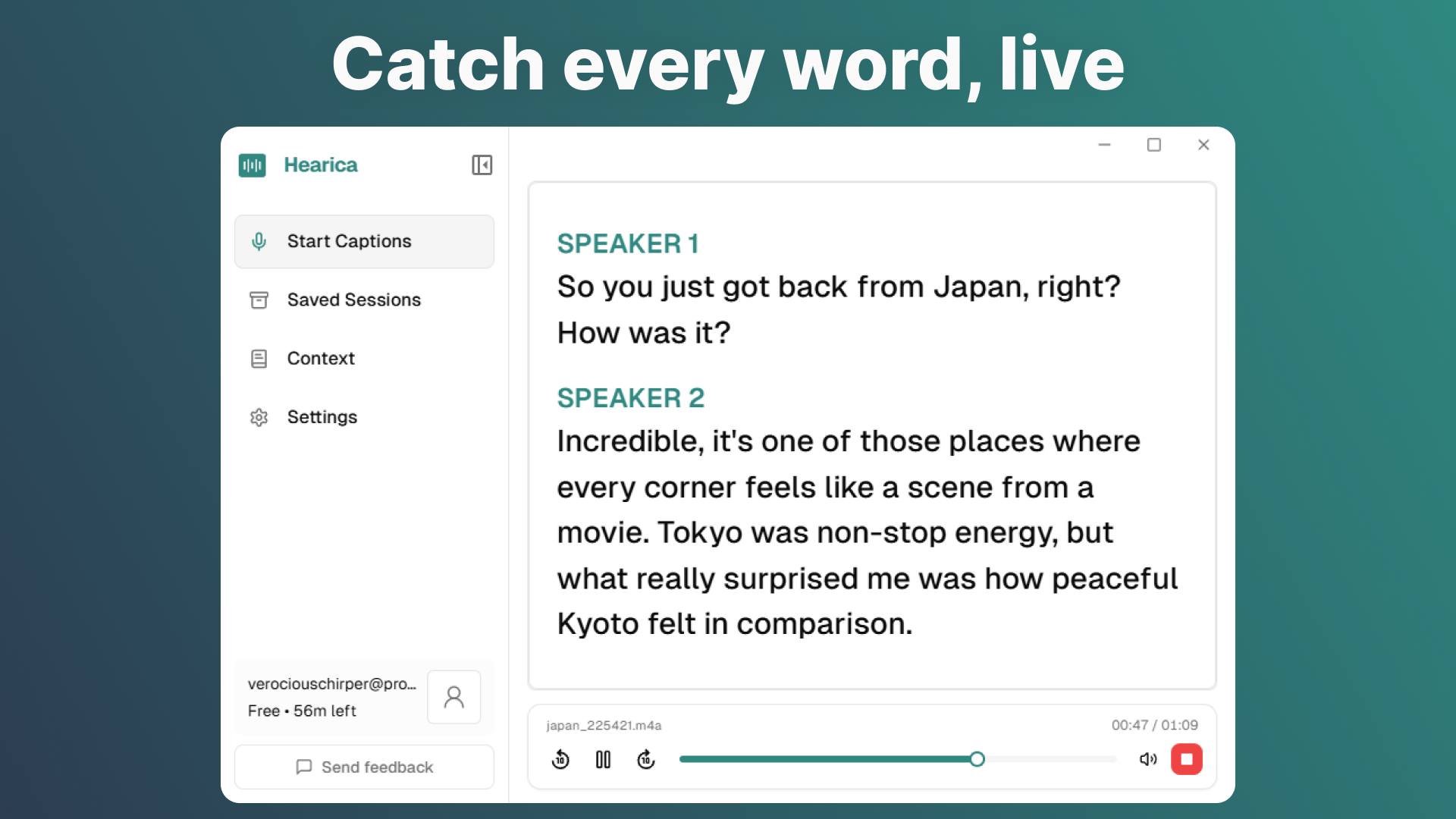
Hearica’s core idea is straightforward: capture all audio coming out of your computer, transcribe it in real time, and surface that transcription as a floating overlay that sits on top of whatever else you’re doing. No switching apps. No configuring integrations. It just listens to what your computer is already playing.
That system-level audio capture is the interesting product decision. Most transcription tools work by intercepting audio at the application layer, which means they need explicit access to each app’s audio stream, which means they need platform buy-in or workarounds that break with every update. Hearica, based on its description, is capturing audio at a lower level, closer to the output itself. That’s a more fragile position in some ways, but it’s also what makes the “any call, any video, any voice” claim plausible.
The overlay stays on screen. You can save sessions and replay them with the original audio. You can export transcripts. You can translate into 60-plus languages. You can add custom context, which I read as domain-specific vocabulary, the kind of thing that prevents a transcription engine from mangling a product name or a medical term.
That last feature matters more than it sounds. Generic transcription accuracy has gotten genuinely good in the last two years. But accuracy in a specific technical or professional context is still uneven, and for someone who relies on captions to do their job, “usually right” isn’t good enough. The ability to prime the model with context is a real usability feature, not a checkbox.
It did well when it launched, which tracks. The product is easy to explain and solves something that affects a lot of people directly.
I’d want to know how it handles multi-speaker audio, which is where most transcription tools start to struggle. And I’d want to know the latency. A caption that arrives three seconds late is nearly useless in a live conversation.
For people already navigating productivity tools that promise system-level smarts, like TypeBoost’s approach to sitting as an AI layer across the Mac or Hush’s attempt to manage the chaos of the full desktop, the idea of another always-on overlay will feel familiar. Whether Hearica executes it cleanly is the question.
The Verdict
Hearica is solving a real problem in the right direction. System-wide captions for any audio output is the correct scope. Every other approach, platform by platform, app by app, is a compromise that serves hearing users fine and serves deaf users poorly.
What I don’t know is whether the execution is there. The website content wasn’t available for review, and there’s no public information about the founders or the underlying technology stack. That’s not a reason to dismiss it, but it does mean I’m evaluating the concept more than the product.
At 30 days, the signal I’d want is retention among deaf and hard-of-hearing users specifically, not just people who downloaded it out of curiosity. At 60 days, I’d want to know if it’s stable across macOS and Windows updates, because system-level audio capture is precisely the kind of thing that breaks when an OS patches something. At 90 days, pricing and whether it’s sustainable as a business.
The concept deserves to exist. Whether this specific implementation of it is the one that lasts is a harder question, and I’d need to actually use it to answer it.
Right now I’m cautiously interested. That’s a better starting position than most.